

For teams researching bill.com nonprofits, the question is not whether BILL.com helps with accounts payable. It does. BILL’s nonprofit page highlights vendor payments, real-time payment status, and tracking payments by donor or grant. The harder question is how far AP automation goes in solving broader oversight risks: restricted funds, chapter spending, cards, reimbursements, controls, and fraud prevention.
TL;DR
- BILL.com helps nonprofits automate AP workflows like invoice approvals, vendor payments, and accounting syncs, but AP automation alone does not solve broader nonprofit financial oversight challenges.
- Operational risk often occurs outside invoices: chapter spending, debit cards, reimbursements, restricted grants, and decentralized accounts can still create visibility and control gaps.
- Nonprofit boards and finance leaders increasingly need banking-level oversight, including spend controls, permission-based access, fund separation, and real-time visibility into how money moves across the organization.
- Crowded complements AP automation* by strengthening the infrastructure layer around banking visibility, internal controls, chapter oversight, and restricted fund management.
- For nonprofits evaluating BILL nonprofit alternatives, the core question is how to govern organizational spending, risk, and accountability at scale.
What Problems BILL.com Solves for Nonprofits
BILL.com helps nonprofits reduce manual accounts payable work. That matters because many nonprofits still rely on inboxes, PDFs, spreadsheets, paper checks, and informal approvals to pay vendors, contractors, venues, consultants, and program partners.
For nonprofit AP automation, BILL can help with:
- Capturing and routing bills for approval
- Reducing manual payment follow-up
- Paying vendors by ACH, check, card, or international payment
- Keeping invoice and payment documentation in one workflow
- Tracking payment status
- Connecting AP activity to accounting systems
BILL also integrates with major finance tools. Its integration directory includes QuickBooks, Sage Intacct, NetSuite, and Blackbaud Financial Edge NXT, among others. For a nonprofit already using QuickBooks, Sage Intacct, NetSuite, or Blackbaud Financial Edge, this can reduce duplicate data entry and make AP reconciliations easier.
That is an operational win. A finance manager no longer has to chase five approvers over email. A controller can see which bills are pending. A treasurer can reduce reliance on paper checks. A board can ask for cleaner AP documentation.
But AP is only one lane in the nonprofit financial control system.
Bill.com Nonprofits: Why AP Automation Alone Does Not Solve Nonprofit Financial Oversight
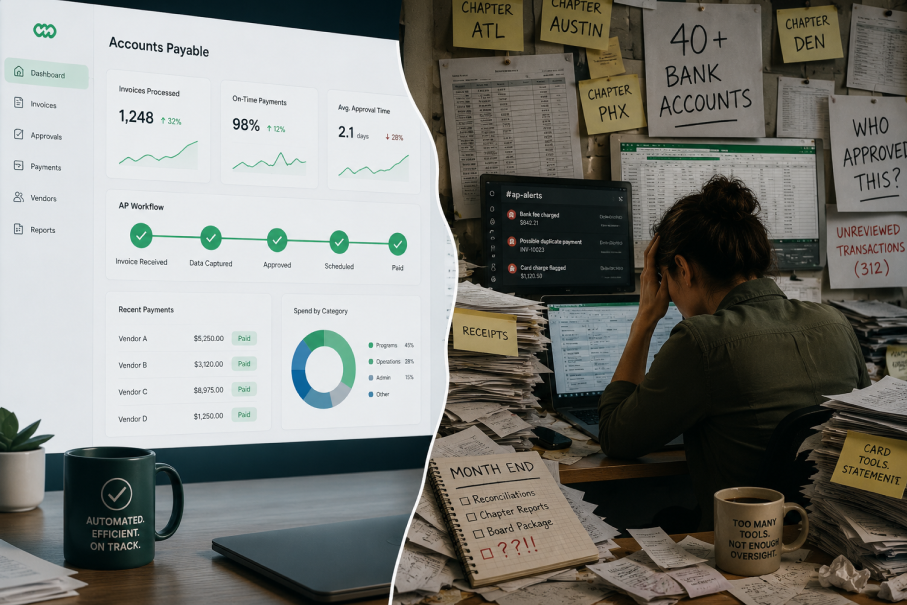
AP automation controls invoices. Nonprofit financial oversight controls how money moves across the organization. That distinction matters. A nonprofit may have clean vendor approvals but still lack real-time visibility into chapter bank balances, restricted grant funds, debit card activity, reimbursement patterns, program-level spending, and unauthorized cash movement.
My audience is nonprofit board members concerned about financial risk and fraud prevention. For that audience, the concern is rarely just, “Did we approve the invoice?” It is usually:
- Who can access the money?
- Which funds are restricted?
- Which chapter spent this?
- Was this expense allowed under the grant?
- Did the bank activity match the board-approved budget?
- Can we detect risky spending before the month-end close?
- Can we separate duties without slowing operations?
BILL.com grant tracking can help associate payments with donors or grants inside the AP process. But restricted fund oversight often begins before a bill is approved and continues after payment clears. If a chapter uses a debit card, a volunteer requests reimbursement, or a program team spends from a local account, that activity may sit outside the traditional AP chain.
That is the oversight gap. A nonprofit banking platform focuses on the money layer: accounts, subaccounts, permissions, cards, balances, transfers, and spend controls. AP automation focuses on the payable workflow. Nonprofits often need both, but they are not interchangeable.
Compare BILL vs. Integrated Banking and Spend Platforms
BILL is best evaluated as AP and financial workflow automation. Crowded is better understood as nonprofit financial infrastructure: banking visibility, chapter-level controls, spend management, and oversight built around nonprofit operating realities.
Category | BILL.com for nonprofits | Integrated nonprofit banking platform |
Primary role | Automates AP, approvals, payments, and documentation | Centralizes banking visibility, spend controls, subaccounts, and financial oversight |
Best fit | Vendor bills, invoice approvals, AP workflows | Restricted funds, chapters, debit cards, reimbursements, and operating balances |
Grant support | Can track payments by donor or grant within AP workflows | Helps structure funds and spending visibility around programs, chapters, or restrictions |
Internal controls | Approval workflows for bills and payments | Permission-based access, card controls, account visibility, and spend guardrails |
Fraud prevention | Helps reduce AP-related risks like missing documentation or unauthorized invoice approvals | Helps reduce risk from unmanaged accounts, card misuse, chapter-level spending, and poor visibility |
Accounting role | Syncs or integrates with accounting platforms | Feeds cleaner financial activity into accounting and reporting workflows |
Nonprofit oversight gap | Does not replace banking infrastructure | Does not replace full accounting or AP automation |
This is not a “BILL is bad” argument. BILL nonprofit alternatives should be evaluated based on the job to be done. If the main issue is invoice routing, AP automation for nonprofits may be the right first move. If the issue is board-level visibility, chapter spending, restricted fund control, and nonprofit fraud prevention, a nonprofit banking platform addresses a different layer of the stack.
Common Audit Challenges Nonprofits Still Face After AP Automation
AP automation can make audits cleaner, but it does not remove every audit challenge.
Auditors and finance committees may still ask for:
- Proof that restricted funds were used correctly
- Clear separation between program, chapter, and operating funds
- Documentation for card purchases
- Reimbursement support
- Bank-level transaction history
- Evidence of internal controls
- User access records
- Approval trails outside invoice payments
- Reconciliation between bank activity and accounting records
For example, a nonprofit may use BILL to pay a consultant invoice tied to a grant. That AP trail may be clean. But if the same grant also funded debit card purchases, chapter reimbursements, or program expenses paid from a local account, the organization still needs banking visibility and spend controls beyond the AP workflow.
That is where nonprofit expense management extends beyond bill payment.
Audit Checklist: Questions to Ask Before Choosing BILL Alone
Use these questions to assess if AP automation alone covers your oversight needs.
- Can we see all bank balances across programs, chapters, and entities in one place?
- Can we restrict who can move money, approve payments, issue cards, or access funds?
- Can we separate restricted grant funds from general operating funds?
- Can we monitor debit card activity before the month-end close?
- Can we connect chapter spending to the right fund, program, or budget?
- Can we document reimbursements without relying on scattered receipts?
- Can the board see financial risk without waiting for accounting reports?
- Can we detect unusual spending patterns early?
- Can we support audits with bank-level records, approval trails, and categorized activity?
- Can our system scale as chapters, grants, and programs grow?
If the answer is mostly about invoices, BILL may suffice. If the answer involves money movement, access control, spending authority, and real-time oversight, the organization likely needs more than AP automation.
Where Crowded Adds the Banking Visibility AP Automation Cannot Provide
Crowded serves as the banking visibility and spend-control layer in the nonprofit financial stack. BILL manages AP workflows: invoices, approvals, vendor payments, and documentation. Crowded supports broader oversight with visibility into funds, access, spending activity, and internal controls.
That matters because many nonprofit risks start outside AP, including chapter spending, debit cards, reimbursements, restricted funds, and program expenses.
Crowded helps nonprofits improve oversight by supporting:
- Banking visibility: See financial activity across accounts, chapters, or programs.
- Spend controls: Limit how funds are accessed and used.
- Subaccount structure: Separate money by chapter, fund, program, or operating need.
- Permission-based access: Control who can view, approve, or spend funds.
- Board-ready oversight: Provide finance leaders with clearer activity trails before month-end or during audit season.
For associations, grant-funded nonprofits, and volunteer-led teams, Crowded helps bring chapter balances, restricted funds, debit cards, reimbursements, and event spending into clearer view.
It does not replace AP automation. It adds the banking visibility, spend controls, and internal control infrastructure that AP tools alone do not provide.
The Bottom Line
BILL.com is useful for nonprofits that need cleaner AP workflows, faster approvals, payment tracking, and accounting integrations. But AP automation is not the same as nonprofit financial oversight.
The gap sits at the banking and spend layer: who controls funds, how funds are separated and restricted, how chapters spend, how cards are managed, and how boards spot risk before audit season.
For nonprofits comparing BILL, BILL nonprofit alternatives, and nonprofit banking platforms, the answer may not be either/or. BILL can automate AP. Crowded helps strengthen the financial infrastructure around banking visibility, spend controls, and internal controls.
That is the difference between paying bills faster and governing money better.
* Crowded Technologies Inc is a financial technology company and is not a bank. Banking services provided by i3 Bank; Member FDIC. The Crowded Technologies Inc. Visa® Debit Card is issued by i3 Bank pursuant to a license from Visa U.S.A. Inc. and may be used everywhere Visa debit cards are accepted.
There are no fees associated with account opening, but transaction fees may apply; please refer to the Crowded Business Deposit Account Agreement for more details on account transaction fees.
Frequently Asked Questions
Can AP automation help prevent nonprofit fraud?
AP automation can reduce certain risks, such as duplicate invoices, missing approvals, or unauthorized vendor payments. But many nonprofit fraud risks happen outside invoice workflows, including debit card misuse, reimbursement abuse, unauthorized account access, or unmanaged chapter spending. That is why many organizations pair AP automation with platforms like Crowded that add banking visibility, spend controls, and permission-based oversight.
Do nonprofit boards need visibility beyond accounting reports?
Yes. Boards often need earlier visibility into spending activity, fund usage, unusual transactions, and internal control risks before month-end close or audit season. Platforms like Crowded help support that visibility with centralized oversight across accounts, cards, and spending activity.
What should nonprofits look for in BILL nonprofit alternatives?
The answer depends on the operational problem being solved. If the challenge is invoice approvals and vendor payments, AP automation may be enough. If the challenge involves restricted funds, chapter oversight, spend controls, reimbursements, or fraud prevention, nonprofits may also need banking infrastructure platforms like Crowded.
Does AP automation replace nonprofit internal controls?
No. AP automation can strengthen approval workflows, but internal controls also include account access policies, spending permissions, segregation of duties, card controls, reimbursement review, and oversight of restricted funds.
Why do nonprofits separate restricted funds from operating funds?
Separating restricted funds helps nonprofits improve grant compliance, reporting accuracy, audit readiness, and donor accountability. Crowded supports this operational structure through subaccounts and clearer visibility into how funds are allocated and spent.
Can nonprofits use AP automation and a nonprofit banking platform together?
Yes. Many nonprofits use AP automation for invoice workflows while relying on nonprofit banking platforms for account visibility, spend controls, card management, and broader financial oversight. The two systems solve different operational problems.