

Most nonprofit finance teams do not start with one payment tool. They add a donation page here, a dues form there and a card reader for the annual event, and each one pays out somewhere different. By year-end, the finance lead is matching deposits to programs by hand.
This guide compares the five main types of nonprofit payment software on the three things that decide whether collection stays manageable as you grow: recurring dues, banking integration and multi-program fund management. It ends with an eight-question scorecard you can take to any vendor demo.
What Should Nonprofit Payment Software With Banking Do?
Nonprofit payment software with banking does three jobs: it takes payments in, it puts the money in an account your team controls, and it records which program or fund each dollar belongs to. A tool that does only the first job leaves the other two to spreadsheets.
The three jobs map to the three needs in this guide:
- Recurring dues support: members can pay monthly or annually without a staff member chasing each invoice.
- Banking integration: collected money lands in the account you spend from, with access controls and statements, instead of waiting in a processor balance.
- Multi-program fund management: dues, scholarship gifts, event fees and grants stay separated by purpose from the moment they arrive.
When these live in separate systems, the cost is fragmentation: more logins, more exports and more places for a restricted gift to be miscoded. For a fuller look at what disconnected finance costs a multi-chapter organization, see how to quantify the cost of chapter financial fragmentation.
Which Types of Nonprofit Payment Software Can You Choose From?
Nonprofits can choose from five types of payment software: peer-to-peer payment apps, general payment processors, donation platforms, membership management software and payment collection built into a nonprofit banking account. Each is built around a different job, so each leaves different questions open.
| Type | Built around | Recurring dues: what to check | Banking: what to check | Multi-program funds: what to check |
|---|---|---|---|---|
| Peer-to-peer payment apps | Sending money between individuals | Can members be billed on a schedule, and can you see who has not paid? | Where does the balance sit, and who else can access it? | Can one payment be tagged to a program? |
| General payment processors | Accepting card and bank payments for any organization | Is recurring billing included or built by you? | Which bank account receives payouts, and how do you reconcile them? | Is fund tracking in the product or in your spreadsheet? |
| Donation platforms | Giving pages, campaigns and donor records | Do they support membership dues, or only recurring gifts? | Where do payouts go, and how do they reach your books? | Can campaigns map to funds in your accounting? |
| Membership management software | Member records, renewals and event registration | Are renewals automatic, and how are failed payments handled? | Which processor and bank sit behind it? | Does revenue split by program and chapter? |
| Collection inside a nonprofit banking account | Collecting into the account you spend from | Can dues recur by card or ACH, with reminders? | Is collection in the same platform as the account? | Can each program or chapter have its own fund account? |
No single type suits all organizations. A donation platform suits campaign-driven fundraising, and a processor suits a team with technical capacity to configure it. The right choice depends on how many programs you run and how much reconciliation your team can absorb.
Our site has reviews of several named tools if you want to go deeper, including Stripe for nonprofits: reviews, fees and compliance considerations, Zeffy reviews and pricing, what happens after a Givebutter donation comes in and whether nonprofits should use Venmo to collect payments. For a shortlist of processors, read our top nonprofit payment processing platforms.
How Should Nonprofit Payment Software Handle Recurring Dues?
Good nonprofit payment software lets members pay dues on a schedule, by the method they prefer, and shows you who has paid, who is late and who needs a reminder. The goal is that no one on your team sends a manual invoice for a renewal that should have run itself.
Recurring dues are membership payments that repeat on a set schedule, such as monthly or annually. When you evaluate a tool, check five things:
- Payment methods: card, Apple Pay, Google Pay and ACH, so members are not forced into one option.
- Schedule options: monthly, annual, or smaller payments toward one dues amount.
- Failed payments: what the member sees, and what your team sees.
- Tracking and reminders: a paid, unpaid and pending view you can export to your CRM or association management system.
- Receipts: automatic confirmations that match your organization’s tax status.
Receipts deserve care. For a 501(c)(3), the IRS requires a written acknowledgment for any single contribution of $250 or more, and a written disclosure when a donor pays more than $75 and receives goods or services in return. A dues payment that includes member benefits can fall into that second rule. The IRS explains both in its substantiation and disclosure requirements for charitable organizations. Confirm the wording with your accountant.
For a wider look at collecting dues, see how to collect membership fees and dues online.
Why Does Banking Integration Matter for Payment Collection?
Banking integration matters because collection is only the first half of a payment: the money still has to reach an account, be approved for use and show up in your books. When payments settle somewhere other than your operating account, your team carries the gap with transfers and reconciliation.
Ask three questions about the bank side of any tool:
- Where does the money land? A payout to a separate bank account adds a transfer step. Collection inside the account you spend from does not.
- Who can see and approve? Look for several admins with their own logins, and read-only access for your bookkeeper or auditor.
- What reaches your books? Check for monthly statements and a clean export or sync to your accounting system.
Also ask which bank holds the funds and how deposit insurance applies, because a software company is not a bank. A payment tool that names its banking partner and explains the arrangement in plain language is easier to evaluate than one that does not. For a bank-side view, see our guide to what to look for in a bank for associations.
How Do You Keep Multi-Program Funds Separate When You Collect?
You keep multi-program funds separate by giving each purpose its own collection link and its own fund account, so that money is separated when it arrives rather than sorted out at month-end. A fund account is a dedicated account for one program, chapter or restricted pool of money.
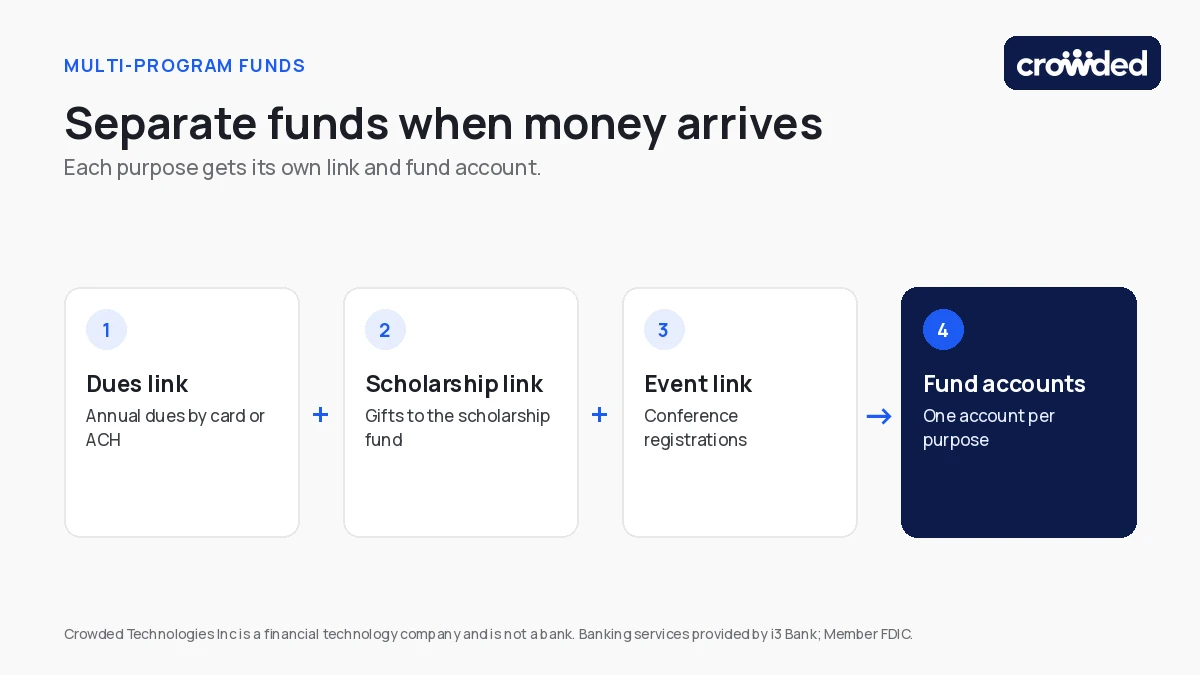
Picture an association finance director in a busy week. Annual dues are coming in by card and ACH, a donor has given to the scholarship fund, and conference registrations are arriving. If all three land in one balance, someone has to split them later and prove the split to an auditor. If each has its own link and fund account, the split already exists.
This matters most for restricted gifts, where a donor limits how money may be used. Separate accounts make the restriction easy to demonstrate. Our guide to tracking donor restrictions across 40 chapters shows how this works at scale.
When you compare tools, ask whether the software can:
- route a payment to a specific program at collection, not afterwards;
- give each chapter or program its own account under the organization’s EIN;
- show headquarters finance a roll-up while chapters keep their own view; and
- export fund-level activity for your accounting software.
What Does Nonprofit Payment Software Cost in Total?
The total cost of nonprofit payment software is the processing fee plus the staff time spent reconciling, so a low headline rate can still cost more than a higher rate with built-in tracking. Compare tools on the same basis before you compare prices.
Ask each vendor for these numbers in writing:
- the card rate and any per-transaction charge;
- the ACH fee, and whether it is a percentage or a flat amount;
- who pays the fee, you or the payer;
- any monthly or setup charge; and
- any charge to move money out to other accounts.
As of October 2026, Crowded’s collection page lists 2.99% of the amount for card payments and $5 for ACH payments. Organizations can cover the fee or ask payers to cover it. Crowded accounts have no minimum balances or subscription fees, and transaction fees apply to some payments.* For more on fee models, read what fundraising platform fee structures really cost and transaction fee models for nonprofit platforms.
The Collect-to-Fund Scorecard: 8 Questions to Ask Any Vendor
The scorecard below turns the three needs into eight questions. A tool that answers all eight clearly is likely to keep collection, banking and fund tracking together as your organization grows.
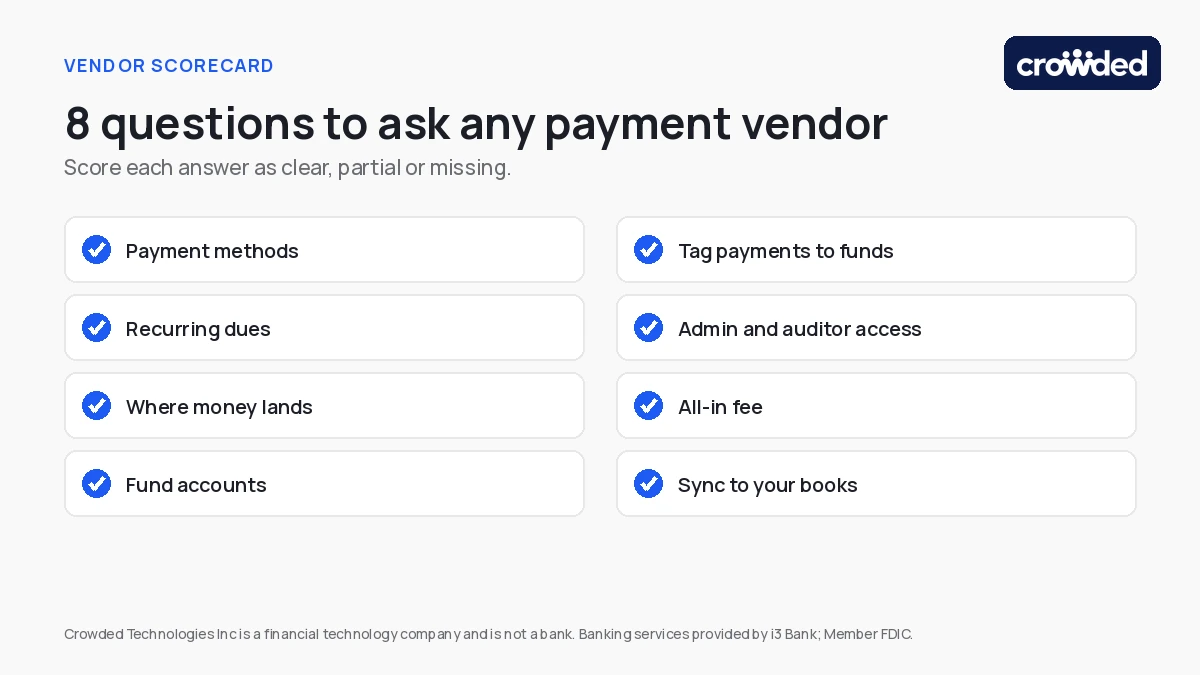
- Methods: Which payment methods can members use: card, Apple Pay, Google Pay, ACH?
- Recurring: Can dues repeat monthly or annually, and what happens when a payment fails?
- Landing account: Where does collected money land, and who holds the account?
- Fund accounts: Can each program, chapter or restricted fund have its own account?
- Tagging: Can you tag a payment to a fund when it is collected?
- Access: Can several admins sign in, with read-only access for auditors?
- Total fee: What is the all-in fee for card and ACH, and who pays it?
- Books: How do transactions reach QuickBooks, Xero or Sage Intacct?
Run the same eight questions with each vendor, and score each answer as clear, partial or missing. The pattern usually shows which tools solve collection only and which solve collection and finance together.
How Crowded Helps Finance Teams Collect, Bank and Report in One Place
Crowded combines payment collection and a nonprofit account in one platform, so dues, donations and event fees land in the account your team spends from. Crowded is a financial technology company, and the accounts are provided by i3 Bank.
Based on Crowded’s payment collection, dues collection and nonprofit account pages, finance teams can:
- create a collection link for dues, donations or events in minutes, and accept card, Apple Pay, Google Pay and ACH;
- let payers pay monthly toward a collection amount, with recurring donations on a monthly or annual schedule;
- track paid, unpaid and pending payments, send reminders and export payer data to a CRM or association management system;
- give each chapter, program or pool of restricted funds its own fund account under the organization’s EIN;
- add several admins with their own logins, plus read-only access for bookkeepers, accountants or auditors; and
- export or sync transactions to QuickBooks, Xero or Sage Intacct.
Iota Phi Theta consolidated 237 accounts on Crowded. The pattern is common for membership organizations: many small accounts and payment tools become one structure with visibility from headquarters.
Crowded is not a fundraising platform or an accounting suite. It works alongside your CRM, association management system and accounting software and replaces the manual work between them. For the wider processing landscape, see the tools behind donations, events and membership dues.
Choose the Tool That Keeps Collection and Funds Together
The right nonprofit payment software is the one where a dues payment, a restricted gift and an event fee each arrive in the right place, with the record already attached. Use the scorecard to find the tools that meet that bar, and be cautious of any tool that leaves banking and fund tracking to a spreadsheet.
If you want to see how collection and fund accounts work together, book a demo with the Crowded team. If you run a smaller organization and prefer to start on your own, you can open an account online.
Crowded is compliant money movement and banking for mission-driven organizations — fund accounts, policy-controlled disbursements, and IRS filings in one platform.
* Recurring Payments are designed for processing subscription payments and monthly charitable contributions and may not be used to collect payments on any debt, loan, or retail installment contract.