

In short, fiscal sponsorship software is financial software that keeps each sponsored project’s donations, restrictions, expenses, and available balance in its own record, and rolls everything up into the sponsor’s books. A good system matches every gift to the right project, applies restrictions before money is spent, keeps receipts on each transaction, lists fees on their own lines, and gives each project lead a view of their own money.
The seven checks below work as a buying guide for sponsor finance teams, pair well with our CFO playbook, and apply whether you run Model A or Model C sponsorship.
TL;DR
- QuickBooks Online retired tags in May 2025, and the custom fields that replaced them allow four per transaction on the Plus plan and twelve on Advanced.
- In QuickBooks Online, journal entries accept classes only, and each project links to a single customer record.
- Social Impact Commons reports sponsor fees of 4% to 8% for Model C and 10% to 15% for Model A, so each project report lists the fee on its own line.
- For any single gift of $250 or more, IRS rules require a written acknowledgment naming the organization, which, in fiscal sponsorship, is the sponsor.
- Our recommendation: once you sponsor several projects, or any project holds restricted grants, choose fiscal sponsorship software that separates money at the account level, and keep classes in the ledger for reporting.
What Fiscal Sponsorship Software Has to Do for Sponsors and Projects
Good fiscal sponsorship software serves two groups from one set of records. Sponsor finance staff get every project in one consolidated view, with controls on spending. Project leads get their own balance, spending, and reports, with access limited to their own project.
Every fiscal sponsor works under a sponsorship model, and that model shapes everything else. In Model A, the project becomes the sponsor’s program, and the sponsor holds full legal and fiduciary responsibility and pays the project’s bills. In Model C, the preapproved grant relationship, the project stays a separate entity and receives regrants from the sponsor. A Model A sponsor needs bills, payroll, and approvals for every project. A Model C sponsor needs a record of each regrant and the reports that come back.
The field is large. In the Fiscal Sponsor Field Scan 2023 by Social Impact Commons and the National Network of Fiscal Sponsors, the 100 responding sponsors supported over 12,000 projects and stewarded over $2.6 billion.
Sponsored Project Accounting in QuickBooks: Class, Project or Separate Account
In QuickBooks for nonprofits, classes handle project reporting, and a separate account per project holds restricted money. QuickBooks projects suit one grant with a start and end date. Each project links to a single customer record, which fits one funder at a time.
Setup | What it separates | What to watch |
QuickBooks class per project | Income and expenses on reports, one class per transaction line | All projects share one bank balance, so a miscoded expense quietly moves dollars between projects |
QuickBooks project per project | Results for one grant or job | Each project links to one customer, and journal entries accept classes only |
Custom fields (replaced tags in 2025) | Extra labels such as campaign or grant | Four per transaction on Plus and twelve on Advanced, according to Intuit’s custom fields overview |
Dedicated account per project | The cash itself, held at the account level | A transaction feed into the ledger keeps the books current |
A class labels money after it moves. A dedicated account keeps it apart before it moves. Sponsors holding restricted grants get the clearest records by using both: separate accounts for the cash, and classes for reporting by program and function. This pairing works with any fiscal sponsorship software that syncs to the ledger.
For a sponsor with two or three small projects and unrestricted gifts only, classes and a monthly spreadsheet reconciliation cover the need. Extra accounts in that case add work.
7 Checks to Track Donations and Expenses by Project
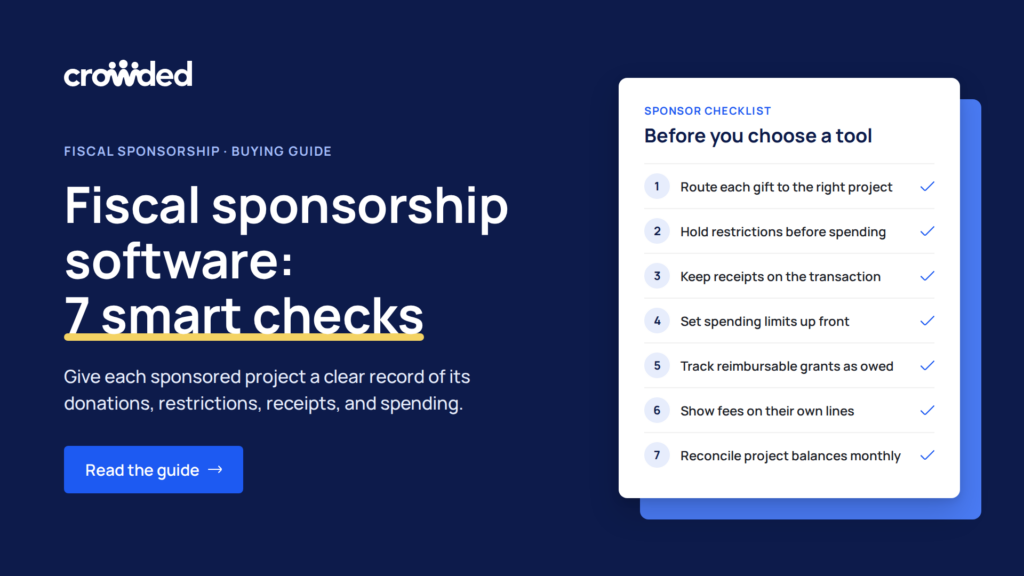
These seven checks show how well fiscal sponsorship software tracks donations and expenses by project, from the moment a gift arrives to the monthly statement a project lead reads.
1. Every Donation Channel Lands on the Right Project
Gifts arrive through the sponsor’s donation page, card payments, crowdfunding pages, Venmo, and Zelle. Each channel needs a route into the sponsor’s account, with the project assigned when the gift arrives. Gifts sent to a project lead’s personal Venmo stay outside the sponsor’s books, leaving gaps in attribution and donor acknowledgments. A donation page for each project, paid into the sponsor’s account, keeps every gift on the record.
2. Restrictions Hold Before Money is Spent
FASB’s ASU 2016-14 requires nonprofits to report two classes of net assets: with donor restrictions and without donor restrictions. Good tools show that split for every project, with a budget vs. actual view for each restricted gift.
Sponsorship agreements give the sponsor final discretion over project funds, a compliance responsibility every sponsor carries. Look for the option to freeze a project’s spending or reclaim its funds when a project drifts from its approved purpose. Our guide to flexibility within restricted grants covers ways to work within grant terms.
3. Receipts and Documents Live on the Transaction
Receipts, invoices, grant agreements, and reimbursement forms attach to the transaction they support, a standard feature of good compliance software. When your auditor samples 40 transactions, each one opens with its documentation already in place.
4. Spending Limits Apply Before the Card Is Swiped
Cards issued per project, with merchant and category limits, stop out-of-policy purchases at the register. Approval thresholds support segregation of duties: one person requests payment, and another approves it.
5. Reimbursable Grants Show as Money Owed
Picture a sponsor with 30 arts projects plus two government grants that pay after costs are incurred. Those two projects spend first and are paid back later. Good software records the expected grant payment as money owed to the project. That keeps the project’s balance accurate and shows the sponsor how much it is fronting.
6. Fees Show on Their Own Lines
For every gift, a project report shows the gross amount, the sponsor fee, the processing fee and the net amount to the project. Fees vary by model: 4% to 8% for Model C and 10% to 15% for Model A, according to Social Impact Commons. An earlier Chronicle of Philanthropy survey found a span of about 1% to 15% of project budgets. Separate fee lines make these comparisons easy.
7. Project Leads See Their Own Project and the Numbers Reconcile
Role-based access lets a project lead check a balance, with a view limited to their own project. The monthly statement follows one formula: opening balance, plus donations and grants, minus sponsor fees, minus expenses, equals the available balance. Restricted funds sit on their own line, apart from money the project can spend freely. Every figure reconciles to the account statement.
How the Four Common Setups Compare
The four common setups differ most on one question: whether project money is separated at the account level or only in the books. That choice decides how well each project’s dollars stay with that project.
Setup (as of October 2026) | How project money is separated | What a project lead sees | Spending limits | Receipts |
Shared bank account plus spreadsheet | One shared balance for all projects | Reports exported and emailed by sponsor staff | Review after spending | Collected by email or shared drive |
General accounting software with classes | In the books, by class | A shared login or exported reports | Review after spending | Attached in the ledger after the purchase |
Nonprofit fund accounting software | In the books, by fund | A report view | Review after spending | Often attached in the ledger |
Banking platform with a fund account per project | At the account level, one account per project | A login limited to their own project | Card limits by merchant and category | Captured with the card transaction |
General accounting and fund accounting tools record restrictions after the fact. Account-level separation and card limits stop the wrong spending before it happens. Many sponsors pair a banking platform for the cash with an accounting system for the books, and good fiscal sponsorship software connects the two.
Which Setup Fits Your Situation
- If you sponsor one to three projects with unrestricted gifts only, accounting software with classes and a monthly spreadsheet reconciliation fits well.
- If project leads spend money themselves, give each project its own fund account and cards, synced to your ledger.
- If you run Model A with project staff on payroll, pair your accounting system’s classes or funds with account-level separation, so bills and payroll stay tied to each project.
- If you hold government reimbursement grants, look for tracking of money owed to each project and a budget vs actual view for each grant.
- If you run Model C and regrant to independent projects, record each regrant as a disbursement with its grant agreement attached, along with the project’s reporting back.
How Crowded Supports Fiscal Sponsors and Sponsored Projects
Crowded, a compliant money movement and banking platform for mission-driven organizations, gives each sponsored project its own fund account under the sponsor. Sponsor staff delegate budgets, set permission tiers for each project lead, and freeze or reclaim a project’s funds when needed. When a project changes leadership, access moves to the new lead on the same account.
Each project can receive budgeted Visa® debit cards limited by category or merchant, with receipts tracked digitally. Each project can also have its own branded donation page that issues automatic 501(c)(3) tax receipts. A dashboard rolls activity up across every project, and transactions sync to QuickBooks Online, Xero, and Sage Intacct. That sync lets Crowded work as fiscal sponsorship software alongside your ledger.
Your accounting system and donor CRM stay in place. The ledger keeps the chart of accounts, functional expense allocation, and audit adjustments, and Crowded handles the money movement around them.
The fund account structure works at scale: Iota Phi Theta consolidated 237 accounts on Crowded. Iota Phi Theta is a fraternity, and it uses the same structure of many accounts under one parent.
Run This Six-Step Test in Every Software Demo
Bring your own numbers to each demo, and ask the vendor of each fiscal sponsorship software option to complete these steps live:
- Record a $10,000 restricted gift to one project.
- Apply your sponsor fee to that gift automatically.
- Submit an expense with a receipt, then approve it as a second user.
- Split one shared bill across three projects.
- Attempt a purchase above the project’s available balance, and confirm the system blocks it.
- Log in as the project lead, and confirm the view shows that project alone.
A tool that passes steps 5 and 6 live in the demo has those controls built into the system.
See how fund accounts for sponsored projects work in practice: book a walkthrough and bring the demo test with you.
Crowded Technologies Inc. is a financial technology company and is not a bank. Banking services provided by i3 Bank, Member FDIC. The Crowded Technologies Inc. Visa® Debit Card is issued by i3 Bank pursuant to a license from Visa U.S.A. Inc. and may be used everywhere Visa debit cards are accepted.
Frequently Asked Questions
What should fiscal sponsorship software track for each project?
It tracks each project’s donations by channel, restricted and unrestricted balances, expenses with receipts, sponsor and processing fees, and the available balance. Crowded builds around its Nonprofit Native value, designing for lean finance teams and volunteers from day one.
Should each sponsored project be a QuickBooks class or a separate account?
For restricted money, use both. Classes handle reporting by project and by function, which supports your functional expense allocation on Form 990. A separate account per project keeps the cash apart before it moves. Small sponsors with two or three projects and unrestricted gifts only can work with classes and a monthly reconciliation.
Who issues tax receipts for gifts to a sponsored project?
The fiscal sponsor issues them because it is the legal recipient of the gift. For any single gift of $250 or more, the IRS written acknowledgment rules call for the organization’s name, the amount, and a statement about any goods or services provided. The receipt can mention the project’s name in its message.
How should sponsor fees appear on a project report?
Each gift shows the gross amount, the sponsor fee, the processing fee and the net amount to the project, each on its own line. Clear fee lines reflect the stewardship behind Crowded’s Trust value, which accounts for every dollar.
What does it cost to run fiscal sponsorship with software?
Costs come in two layers: the fee the sponsor charges each project, covered in check 6, and the sponsor’s own cost for software or banking. The second layer depends on plan tier and number of projects. Crowded is a compliant money movement and banking platform for mission-driven organizations.
How does a sponsor track a multiyear grant for one project?
Record the full award when it arrives, with its restriction coded in your chart of accounts, and release funds as the project meets each year’s terms or milestones. Give the grant its own budget vs actual view, and keep its documents on the related transactions. Your auditor will test each year’s release against the grant agreement.
Can a small sponsor start with spreadsheets?
Yes, for two or three projects with unrestricted gifts. As projects grow, reconciling and balancing requests by email takes more time, and one formula error can misstate a restricted fund. Plan the move to dedicated software ahead of the first audit that includes restricted project money, and use our compliance checklist to prepare.